Hadoop has become a foundational tool in the big data ecosystem, widely used for distributed storage and processing of large datasets. This article walks through the installation and configuration of Hadoop 3.4.1 and HDFS on a Kali Linux system. Designed for students and professionals alike, the steps below outline a hands-on, local setup using a non-root user—ideal for experimentation, learning, and lightweight development.
Understanding the Basics
Hadoop is an open-source framework that allows distributed processing of large data sets across clusters of computers using simple programming models. Its core modules include:
- HDFS (Hadoop Distributed File System): For scalable, fault-tolerant storage
- MapReduce: A computation model for parallel processing
- YARN: Yet Another Resource Negotiator, used for cluster resource management
Before diving into setup, it's essential to understand the significance of each component and why configuration matters. Setting up Hadoop locally on Kali Linux (or any Unix-based OS) provides valuable insights into its core mechanisms and how real-world clusters are managed.
Prerequisites
Before diving into Hadoop, ensure your system is ready:
1. Update System & Install Java
Hadoop requires Java. We'll use OpenJDK 8.
BASHsudo apt update sudo apt install openjdk-8-jdk -y java -version; javac -version
2. Install SSH
SSH is used by Hadoop daemons for communication.
BASHsudo apt install openssh-server openssh-client -y
3. Create a Hadoop User
Avoid using root. Create a dedicated user:
BASHsudo adduser hdoop sudo adduser hdoop sudo su - hdoop
4. Setup Passwordless SSH
This enables internal Hadoop communication.
BASHssh-keygen -t rsa -P '' -f ~/.ssh/id_rsa cat ~/.ssh/id_rsa.pub >> ~/.ssh/authorized_keys chmod 0600 ~/.ssh/authorized_keys ssh localhost
Download and Extract Hadoop
BASHwget https://downloads.apache.org/hadoop/common/hadoop-3.4.1/hadoop-3.4.1.tar.gz tar xzf hadoop-3.4.1.tar.gz
Configure Environment Variables
Edit
BASHsudo nano .bashrc
Add these lines at the end of code:
BASHexport HADOOP_HOME=/home/hdoop/hadoop-3.4.1 export HADOOP_INSTALL=$HADOOP_HOME export HADOOP_MAPRED_HOME=$HADOOP_HOME export HADOOP_COMMON_HOME=$HADOOP_HOME export HADOOP_HDFS_HOME=$HADOOP_HOME export YARN_HOME=$HADOOP_HOME export HADOOP_COMMON_LIB_NATIVE_DIR=$HADOOP_HOME/lib/native export PATH=$PATH:$HADOOP_HOME/sbin:$HADOOP_HOME/bin export HADOOP_OPTS="-Djava.library.path=$HADOOP_HOME/lib/native"
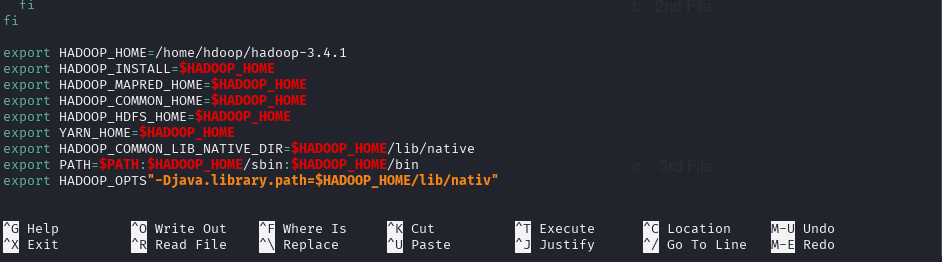
Then reload the file:
BASHsource ~/.bashrc
Configure Hadoop Core Files
Edit hadoop-env.sh
BASHnano $HADOOP_HOME/etc/hadoop/hadoop-env.sh
Add this line:
BASHexport JAVA_HOME=/usr/lib/jvm/java-11-openjdk-amd64
Edit core-site.xml
BASHnano $HADOOP_HOME/etc/hadoop/core-site.xml
XML<configuration> <property> <name>hadoop.tmp.dir</name> <value>/home/hdoop/tmpdata</value> </property> <property> <name>fs.default.name</name> <value>hdfs://localhost:9000</value> </property> </configuration>
Edit hdfs-site.xml
BASHnano $HADOOP_HOME/etc/hadoop/hdfs-site.xml
XML<configuration> <property> <name>dfs.name.dir</name> <value>/home/hdoop/dfsdata/namenode</value> </property> <property> <name>dfs.data.dir</name> <value>/home/hdoop/dfsdata/datanode</value> </property> <property> <name>dfs.replication</name> <value>1</value> </property> </configuration>
Edit mapred-site.xml
BASHcp mapred-site.xml.template mapred-site.xml nano $HADOOP_HOME/etc/hadoop/mapred-site.xml
XML<configuration> <property> <name>mapreduce.framework.name</name> <value>yarn</value> </property> </configuration>
Edit yarn-site.xml
BASHnano $HADOOP_HOME/etc/hadoop/yarn-site.xml
XML<configuration> <property> <name>yarn.nodemanager.aux-services</name> <value>mapreduce_shuffle</value> </property> <property> <name>yarn.resourcemanager.hostname</name> <value>127.0.0.1</value> </property> </configuration>
Start Hadoop Services
Format the NameNode
BASHhdfs namenode -format
Start HDFS
BASHstart-dfs.sh
Start YARN
BASHstart-yarn.sh
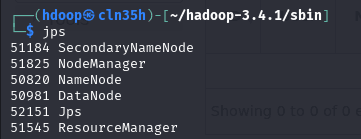
Check Running Processes
BASHjps
You should see processes like
By following the steps in this guide, you've successfully installed and configured Hadoop and HDFS in a standalone environment. This local setup is perfect for learning Hadoop's core components like MapReduce, HDFS, and YARN and for running small test jobs.
Whether you're preparing for a data engineering role, experimenting with distributed computing, or just curious about big data infrastructure, this Kali Linux-based Hadoop setup offers a controlled, educational sandbox.
From here, you can:
- Write MapReduce programs in Java or Python
- Explore data ingestion tools like Apache Sqoop or Flume
- Connect Hadoop to Hive or Spark for advanced analytics
This practical foundation prepares you to take on larger-scale deployments in the cloud or on actual clusters with confidence.